Property View
To show detailed information about any subject of an application (such as disk, partition, volume, file etc.) Active@ KillDisk uses information views. When displayed these views show information about the object being selected in the Disk Explorer. If selected object is changed, displayed information refreshes. Also S.M.A.R.T. parameters are display for the selected disk (if the device supports it).
SMART data can be used to detect problem disks as long as important disk information has been reflected such as Power-on Hours, Reallocated Sectors and Current Pending Sectors.
When Current Pending Sectors parameter differs from zero, this means the disk has bad sectors. It will cause problems in the future. Dispose these disks as soon as possible.
To open Property view for selected item do one of the following:
- Click from the main menu
- Press F4 (keyboard shortcut)
- Click Properties command from object's context menu
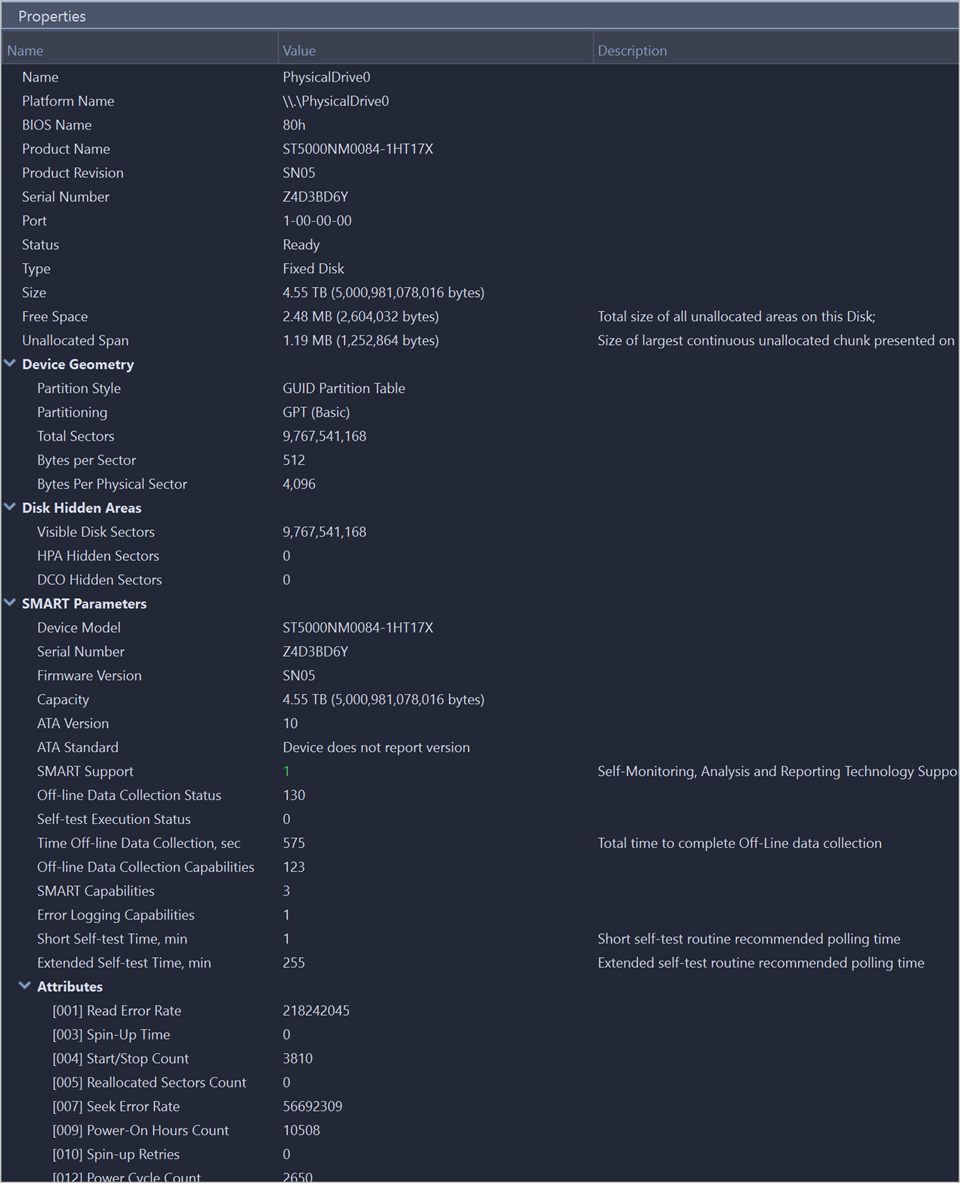
Besides displaying a valuable data it also allows you to copy that information into a clipboard by using context menu commands.
Context menu commands:
- Copy
- Copy information of selected object in property tree to the clipboard
- Copy Value
- Copy Value of selected field to the clipboard (value only)
- Copy Field
- Copy formatted Name and Value pair to the clipboard
- Copy All
- Copy all information as formatted set of Name and Value pairs
Copied Information Example
Fixed Disk PhysicalDrive0
  Disk Attributes............................Fixed, HPA DCO Ready, Wipeable, Erasable, SMART Ready, Security Supported, Security Frozen
  Device Key.................................disk-ST5000NM0084-1HT17X-SN05-Z4D3BD6Y
  Node Attributes............................Disk, Ready, Populated
  Controller Port............................1-00-00-00
  Name.......................................PhysicalDrive0
  Platform Name..............................\\.\PhysicalDrive0
  BIOS Name..................................80h
  Product Name...............................ST5000NM0084-1HT17X
  Product Revision...........................SN05
  Serial Number..............................Z4D3BD6Y
  Port.......................................1-00-00-00
  Status.....................................Ready
  Type.......................................Fixed Disk
  Size.......................................4.55 TB (5,000,981,078,016 bytes)
  Free Space.................................2.48 MB (2,604,032 bytes)
  Unallocated Span...........................1.19 MB (1,252,864 bytes)
  Device Geometry
    Partition Style..........................GUID Partition Table
    Partitioning.............................GPT (Basic)
    Total Sectors............................9,767,541,168
    Bytes per Sector.........................512
    Bytes Per Physical Sector................4,096
  Disk Hidden Areas
    Visible Disk Sectors.....................9,767,541,168
    HPA Hidden Sectors.......................0
    DCO Hidden Sectors.......................0
  SMART Parameters
    Device Model.............................ST5000NM0084-1HT17X
    Serial Number............................Z4D3BD6Y
    Firmware Version.........................SN05
    Capacity.................................4.55 TB (5,000,981,078,016 bytes)
    ATA Version..............................10
...
If any device is not selected in Disk Explorer or My Computer is selected in Disk Explorer's My Computer view, software and hardware information is displayed in the Properties view.
Copied Hardware and Software Information Example
 My Computer
  Workstation ID.............................System Serial Number
  System Information
    Operating System.........................Windows 11 24H2
    Platform.................................64-bit
    Administrator Rights.....................Yes
    User Name................................Alex
    Host Name................................Win11x64-1
    Kernel Version...........................10.0.26100 (winnt)
  Version Information
    License..................................User License
    Registered to............................LSoft Development
    Kernel Version...........................15.10.28
    Product Version..........................8.0
    File Version.............................8.0.35
  Hardware Information
    Processor................................Intel(R) Core(TM) i7-7700 CPU @ 3.60GHz
    Processor Architecture...................x86_64
    Logical Processors.......................8
    Memory...................................22,9 ГБ
    Motherboard..............................ASUSTeK COMPUTER INC. PRIME B250-PRO
    Motherboard Serial.......................161290869600098
    BIOS Name................................American Megatrends Inc. 1205
    BIOS Serial..............................System Serial Number
    Desktop..................................1920 x 1038
    Controllers
      IDE Controllers
        Intel(R) 300 Series Chipset Family SATA AHCI Controller
        SCSI Controllers
        LSI, SAS2 2008 Falcon
...