Processing Summary
Once the Active@ KillDisk finishes processing tasks, a Processing Summary dialog appears. It contains all information regarding the performed task, including starting attributes, logs, and detailed results. It also provides an opportunity to generate additional outputs (prints) if applicable
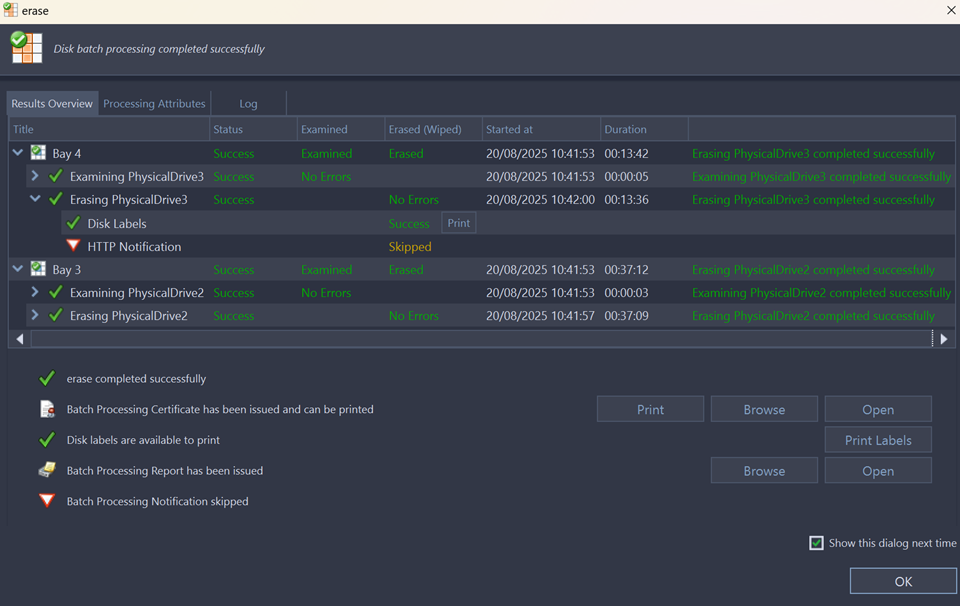
- Title
- All the devices processed are displayed with their erase status
- Status
- An actual erase status (success/fail)
- Errors
- Displayed number of errors detected (if any)
- Label
- Volume or partition description
- Method
- Erase/Wipe sanitizing method being used
- Erase Passes
- Number of overwriting passes performed
- Started at
- Time & date of operation's start
- Duration
- Duration of the operation.
The Processing Attributes tab contains detailed information about operation status and processing attributes.
The Log tab displays only the log records that relate to the completed process, providing detailed information about all aspects of the processing sequence.
Note:
The Wipe operation will produce a similar processing summary for the Disk Wipe.
- Disk Certificate
- Status of the saved PDF certificate. Allows user to print certificate (Print button), browse certificate directory with a file browser (Browse button) or examine certificate (Open button).
- Print Labels
- Examine, customize, change options and print Labels by clicking the Print Labels button.
- Disk Processing Report
- Status of the saved Processing Reports. Examine the disk processing report .xml file (click Browse button to navigate to the containing folder) or preview the report (Open button).