Create a New Label Template
In addition to predefined templates, a custom template can be created for use with either sheet or tape
media. To create a custom label template, click the  Create Template button on the Disk Label Templates page.
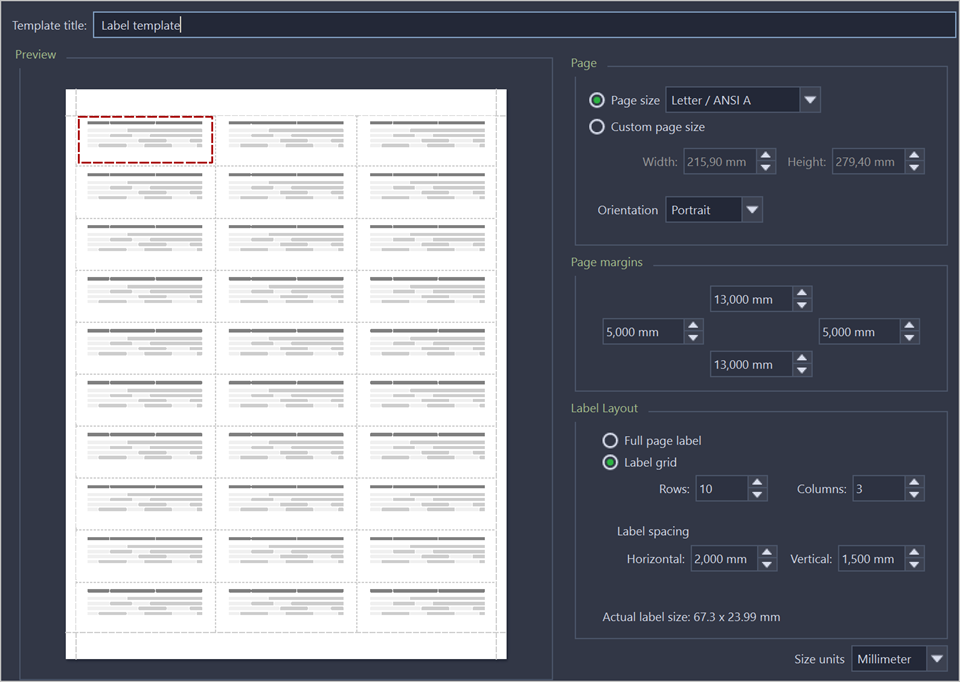
- Template title
- Sets a custom title for your template. This is the name to refer this template when selecting it in the Print Label dialog.
- Page
- Specify the dimensions of the page being used to print the labels. Select page size from the list of standard sizes or define custom size using exact measurements. Define page orientation.
- Page margins
- Page margins are defined for the top, bottom, left and right sides of the page.
- Label layout
- Define how the labels appear on the page. Define the spacing in between labels on the page and the dimensions of the label grid. Once you entered the proper measurements, Active@ KillDisk takes care of all formatting.
- Size units
- The units of measurement may vary between millimeters, inches, pixels and points. If a value is entered in one measurement and then size unit is changed, the appropriate conversion takes place.