Configuring DHCP and TFTP settings
Configuring a TFTP server is made simple with a tool called Serva. You can download it here.
This tool is an “Automated PXE Server Solution Accelerator” that supports a variety of server protocols. The ones we will be configuring are TFTP and DHCP.
-
Configure DHCP settings
Configure your DHCP settings. You may copy the ones below, just make sure the address it binds to is a static IP address from your router. Under IP Pool 1st addr, input the first available IP address in your routers IP pool settings.
Figure 1: DHCP Configuration 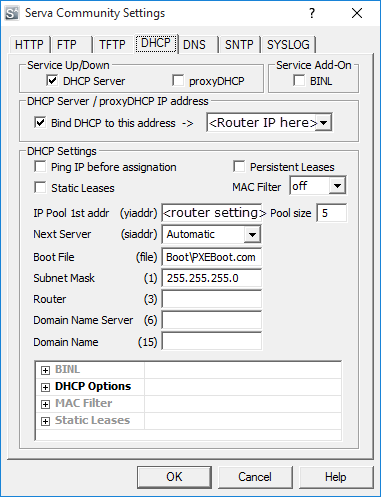
-
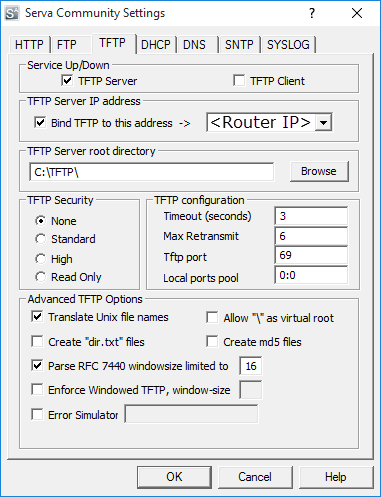
Configure TFTP settings.
Configure your TFTP settings. You may also copy the setting below. Again, make sure the IP address is your router’s static IP and the TFTP server root directory is the one you configured in Step 1.
Figure 2: TFTP Configuration