Data Inspector
The Data Inspector is a small viewing tool that provides the service of “inspecting” (or interpreting) data currently selected in the edit pane. The Data Inspector lets you view the type of data you have selected. This can help you interpret data as displayed in Disk Viewer.
To open the Data Inspector from the main menu choose .
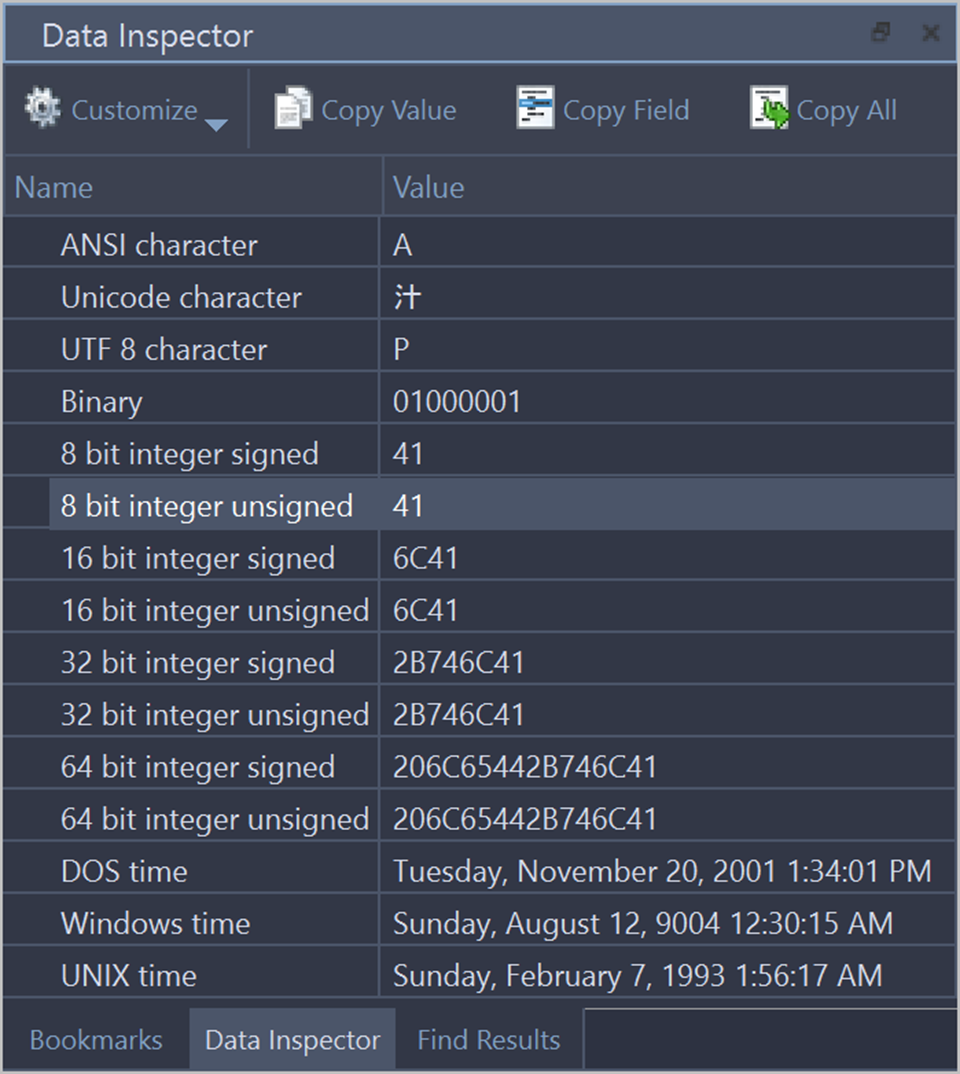
- Customize
- These settings let you customize appearance for better experience with data.
- Copy Value
- Copy value of selected field to clipboard.
- Copy Field
- Copy entire selected field (value and field name) to clipboard.
- Copy All
- Copy all name and value fields in a view to clipboard.
Use view context menu to execute these commands for selected item (field).
- Interpretation fields
- Turn on/off interpretation fields, such as: ANSI, Unicode and UTF 8 characters, Binary, 8, 16, 32, 64 bit integer signed and unsigned, DOS, Windows and Unix times. Show All option turns on all fields and Show Service Fields option displays fields such as Raw (HEX) value, Sector, Offset.
- Fields formatting
- Interpretation filed could show data in one of the following formats:
- Decimal
- Changes data basis to decimal;
- Hexadecimal
- Changes data basis to hexadecimal;
- Octal
- Changes data basis to octal.
- Use locale
- Displays time/data in local format.
- Big Endian
- Toggle between little endian and big endian value representation. See: Big Endian/Little Endian.
The Data Inspector window is dockable and its location can be changed by clicking on the window title and dragging it to the new one. If the Data Inspector window is sharing its space with other tool views, you can change its relative position by left clicking and dragging the window tab. You can close the window by clicking on the [X] button in the top right corner of the window and reopen it again using the View menu in the main menu.