Wipe Algorithms
The process of deleting files does not, in reality, eliminate them from the hard drive; unwanted information may still be left on the computer, available for recovery. A majority of software that advertises itself performing reliable deletions simply wipes out free clusters; however deleted information may be kept not only in these areas, which is why KillDisk offers the following extra steps to ensure secure deletion:
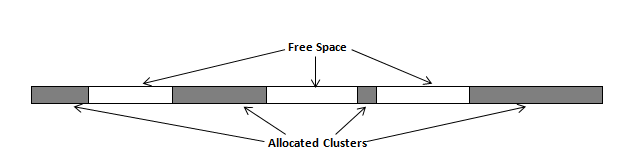
NTFS:
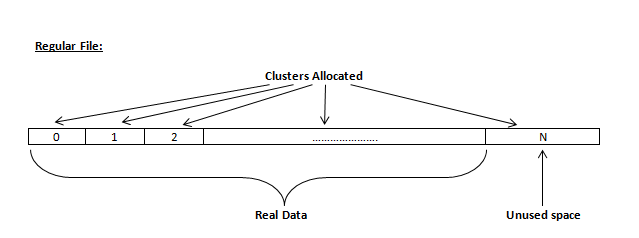
- Regular files. The wiping of free space, found in the "tail" end of the file, since the disk space is usually separated allocated in clusters(usually 4KB in size), and a files usually mostly haves sizes that aren't rounded down to the cluster.
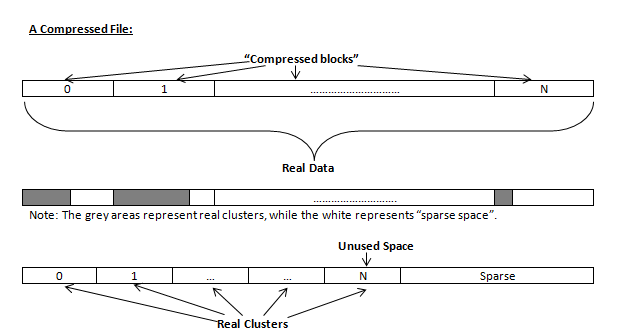
- Compressed Files. Wiping free space inside a file: The algorithm NTFS has to "compress" a file separates it into compressed blocks (usually 64KB long). After it is processed, each of these blocks has been allocated a certain amount of space on the volume; if the compressed information takes up less space than the source file, then the rest of the space is labeled as sparse space and no space on the volume is allocated to it. Because often times the compressed data doesn't have a size exact to the cluster, the end of each of these blocks stays as unusable space, usually being a significant amount of space in size. Subsequently, our algorithm goes through each of these blocks in a compressed file and wiped the unusable space, erasing previously deleted information that was kept in those areas.
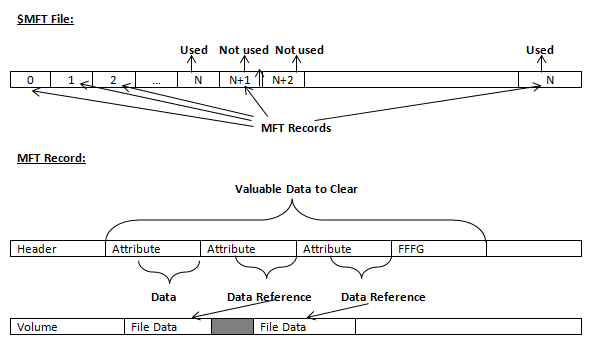
- The MFT (Master File Table) Area. Wiping the system information: the $MFT file contains records, describing every file on the volume and during the deletion of these files, the records of their deletion are left untouched; they are simply recorded marked as "deleted". Because of this, file recovery software can use this information to recover anything from the name of the file and the structure of the deleted directories to entire files smaller than 1KB that are able to be saved in the MFT directly. The algorithm used by KillDisk wipes all of the unused information out of the MFT records and wipes the unusable space, making a recovery process impossible.
- Wiping Confidential Data from Unoccupied Drive Space
- Wiping NTFS
- Wipe FAT
- Wipe HFS
|
This document is available in PDF format, which requires Adobe® Acrobat® Reader
(Free download):
|

